

We've made our website more accessible with the Recite Me Assistive Toolbar.
You can now personalise your experience and access content in the way that works best for you. Features include:
- Reading aids for focus and comprehension
- Customisable styling options
- Translation into 100+ languages
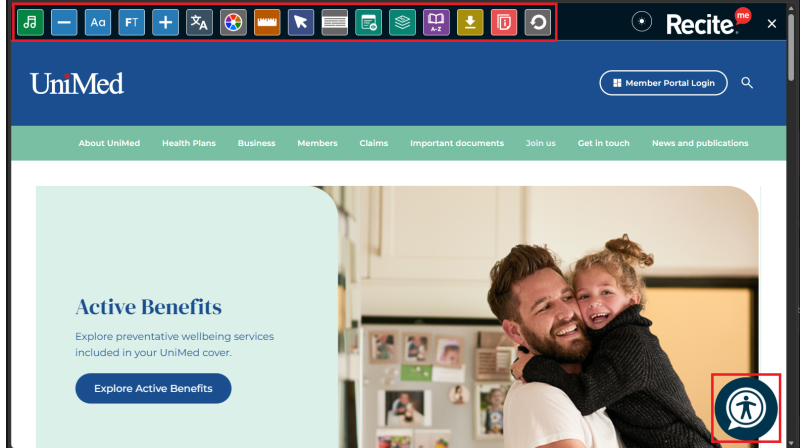
You can access the Recite Me Assistive Toolbar by selecting the round icon on the bottom right corner of your screen. Once you click on the icon, it will launch the assistive toolbar.
Key Features
Language Options
You can choose to translate our website into more than 100 languages.
Please note that the translations are machine generated and may not always be perfect. For official or legal purposes, the English version is the authoritative one.
Text & Styling Tools
Recite Me assistive technology also allows you to customise the appearance of our website. You can customise the colour scheme as well as the text, font style, size, colour, and spacing making content easier to read.
Decrease Size: Decrease text size.
Change Font: Change the font of the text on the page.
Focus Text Mode: Highlight half of a word in bold to improve readability.
Increase Size: Increase text size.
Colour Options: Customise background colour and text colour.
Focus Tools
While reading content online, you can sometimes lose track of where you are on a page. Recite Me provides five tools to help you focus:
Enable Ruler: Adds a ruler to the page to make reading easier.
Cursor Options: Increase or decrease cursor size and edit colour.
Enable Screen Mask: Focus on a specific section of the website.
Page Options: Includes Pause Animations, Hide Images, View Image Text and Plain Text Mode.
Page Structure: Allows you to navigate the site via Landmarks, Headings and Links.
Reading Aids
Insurance can be intimidating, but it doesn't have to be. We want our website to be easy to use and understand. The Recite Me Assistive Toolbar provides three tools in this space:
Use Dictionary: Search for definitions of words on the page.
Page Summary: Summarise all content on a page into a paragraph.
Simplified Content: Making content easier to read whilst keeping the key messages.
Turning Off the Toolbar
Once you are done using Recite Me's assistive toolbar, you can click the "x" in the upper right hand corner to remove it from your screen.